Lab 3: Using tags with Ansible
Overview
In this lab, we will use tags to selectively run only certain parts of the playbook. You can learn more about tags from the Ansible Tags Documentation.
Objective
- Use tags to re-run a subset of the first playbook
Lab Requirements
- SSH or Terminal access to the Ubuntu Jumpbox/Ansible Host
- Access to the BIG-IP TMUI (Web GUI)
Estimated completion time: 10 minutes
TASK 1 - Delete the virtual server
1. In the BIG-IP web GUI, from the left-hand navigation menu, navigate to Local Traffic -> Virtual Servers
- Select the web_vip virtual server, and click Delete…
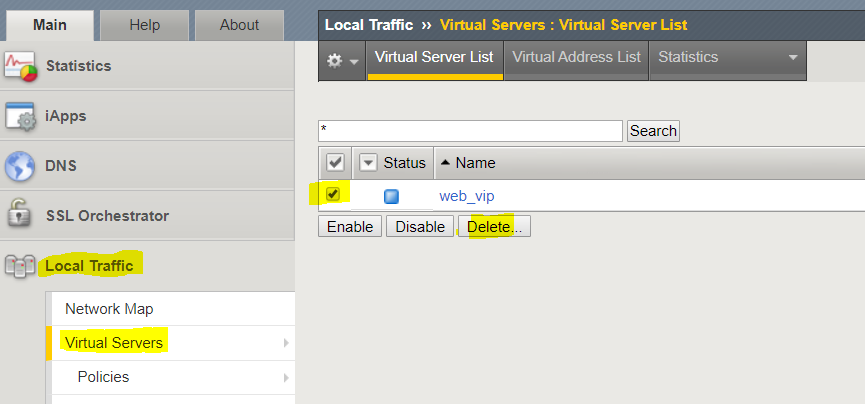
- On the following screen, click Delete again to confirm.
Note
The Virtual Server list should now be empty
TASK 2 ‑ Re-run the playbook with a specific tag
1. From the SSH or terminal session, re-run the playbook with the “virtual” tag:
$ ansible-playbook -i inventory/hosts first.yaml --tags virtual
Watch the output from the ansible-playbook command… do you see all of the same lines that you did in the last lab?
- Back in the BIG-IP GUI, refresh the Virtual Servers list.
TASK 3 - Remove the configuration from the first playbook
- From the SSH or terminal session, examine the firstdel.yaml playbook:
$ less firstdel.yaml
Note
You’ll notice two main differences between this playbook and the
first.yaml playbook. First, you’ll see that each task includes the
state: absent parameter. This tells Ansible to remove the object
defined in the task rather that create it. You’ll also notice that the tasks
are in the opposite order from the first playbook. This is because Ansible
executes tasks in order, and it is necessary to delete objects in the correct
order, i.e.: you cannot delete a pool if a virtual server is using it.
- Execute the firstdel.yaml playbook:
$ ansible-playbook -i inventory/hosts firstdel.yaml
4. Back in the BIG-IP GUI, go back to the Virtual Servers, Pools, and Nodes screens, and confirm that the configuration has been deleted.
Note
Keep your SSH or terminal session open for the next lab.